
دراسات الحالة
شركة شي روجومي

مشاركة وإدارة تفاصيل الشاشة مع استوديوهات الشركاء لإنتاج فيلم PARASYTE يتكون فيلم PARASYTE من حلقتين، الأولى صدرت في اليابان في 29 نوفمبر 2014، والحلقة الأخيرة ستصدر في 25 أبريل 2015.
مقابلة مع: ماسارو سوزوكي، مدير قسم الأنظمة SHIROGUMI INC. هي واحدة من أكبر استوديوهات إنتاج الرسوم المتحركة والمؤثرات البصرية في اليابان. يقع مقرها الرئيسي في أوياما، طوكيو، مع استوديوين آخرين في سانجينجايا وتشوفو. أجريت هذه المقابلة في استوديو تشوفو. |
|

هل يمكنك أن تخبرنا عن تنظيم فريقك وبيئة الإنتاج؟
|
سوزوكي : نقوم بإنشاء تأثيرات بصرية للأفلام بفريقين - فريق الرسوم المتحركة وفريق التركيب. نفضل أن يكون لدينا شاشات مزدوجة مع محطة عمل HP Z820. الشاشة الرئيسية يتم التحكم في ألوانها للتحقق من اللون النهائي، والشاشة الفرعية لتشغيل البرامج. يحتاج الفنانون إلى معاينة 10 بت، لذا اخترنا بطاقات GPU NVIDIA Quadro. يستخدم فريق التركيب CG245W منذ عام 2011، بينما يستخدم فريق الرسوم المتحركة الآن CG246. لقد قمنا باستبدال الشاشات تدريجيًا، ومع فيلم PARASYTE، يستخدم كلا الفريقين ColorEdge. كما قمنا بالتبديل من استخدام ColorNavigator 6 إلى ColorNavigator NX لإدارة جميع شاشات ColorEdge في الاستوديو. بالنسبة لبيئة الكمبيوتر الشخصي، يستخدم فريق الرسوم المتحركة Autodesk Maya على Linux وأجهزة الكمبيوتر الثانوية التي تعمل بنظام Windows، وكلاهما متصل بشاشات ColorEdge. يستخدم فريق التركيب The Foundry NUKEX وAdobe على Windows 7 Professional 64bit. هاياكاوا : يتم تشغيل ما مجموعه 17 شاشة ColorEdge في استوديو Chofu. يتكون الفريق من ثمانية فنانين من فريق الرسوم المتحركة بالكمبيوتر وستة فنانين من فريق التركيب. يستخدم المخرج واثنان من مشرفي المؤثرات البصرية شاشات ColorEdge كجزء من محطة عمل مشتركة تستخدم HIERO من The Foundry. |
 |
| |
ماسارو سوزوكي مدير قسم النظام |
ما الذي جعلك تقرر استخدام شاشات ColorEdge؟
|
سوزوكي : لن تبدو شاشة الإنتاج LCD ذات الإضاءة الخلفية متطابقة تمامًا مع جهاز عرض سينمائي، لكننا نشعر بالحاجة إلى إنشاء بيئة يكون فيها الاختلاف ضئيلًا قدر الإمكان. تستخدم غرفة العرض في Picture Element, Inc.، حيث يتم إجراء التصحيح النهائي للألوان، شاشات ColorEdge ذات فروق ألوان صغيرة للغاية لإدارة البيانات. سيتم الانتهاء من PARASYTE وفقًا لمعيار DCI-P3، لذا فقد قررنا أنه من الضروري لفريق CG أن يكون لديه أيضًا شاشات ColorEdge لسير العمل الخطي. ستكون الشاشات التي يمكنها إعادة إنتاج مجموعة ألوان DCI-P3 بدقة ضرورية أيضًا لفريق CG الخاص بنا باستخدام Autodesk Maya. Hayakawa: We began working with a linear workflow starting with our compositing team, which was using NUKEX. The CG Team had been working with sRGB monitors as their standard, making it unfeasible to switch the whole team at once, so they continued to use only the monitors they had until software support became available. Over the course of a number of projects, the compositing team was ready for a linear workflow and Autodesk Maya was also ready for the change. So with the timing for this production in mind, we switched our overall production workflow to this model. This meant that the compositing team would be able to see the images for PARASYTE produced and passed along by the CG team with a consistent look. Suzuki: As far as introducing color management monitors to a company is concerned, I think you’ll find that no matter what company you look at, they need to be gradually phased in, and I think it’s best to do so starting from the last process in the workflow. We’ve found that the gradual phasing-in also works better because your artists will gain a stronger understanding on just why color management monitors are needed. |
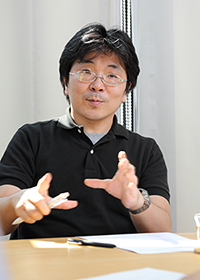 |
| Tsuguo Hayakawa Systems Engineer & 3D Match Moving |
|
| |
|
| |
So one of the advantages of going with ColorEdge was being able to confirm correct colors, then?
Hayakawa: Yes. In our studio, images rendered by the CG team are near-final, including color. They are then passed along to the compositing team, where they match and fine-tune them for each scene. In other studios, the CG team may produce the image in detailed parts to be finished by the compositor, but this requires more CPU power and a larger volume of data. Here, as we approach the final image, it’s important for the teams to be able to quickly preview and fine-tune with the same images. That is the biggest reason why the CG team needs ColorEdge. The compositor’s job is not easy even if the CG team renders the image well. Our artists spend a great deal of time for the best results. It can’t be just good… it has to be exceptional. Two years ago when we were working on the film The Eternal Zero, the compositing team was working with the DCI-P3 standard in order to match the final product using ColorEdge monitors, but the CG team was working with an sRGB environment that had software limitations. This resulted in differences between the two environments that led to difficulties in fixing the color inconsistencies. We felt the need to standardize our environments to match our production monitors, and having the same colors on both sides has been especially beneficial for live-action VFX films.
Suzuki: There have also been significant advantages to having our partner studios introducing ColorEdge monitors as well. When passing along the image to be used as the standard, if it looks different on each studio’s end, the resulting finished image will need fixing. On the other hand, when we are all using ColorEdge monitors, we’re able to minimize any potential discrepancies.
Hayakawa: For the production of the film The Eternal Zero, our partner matte image team, Fude, also began to use ColorEdge monitors prior to our partner studio DAG Inc. They calibrated them to match the environment we were using internally, making any back-and-forth work much easier on both of us. We’ve been really thankful to be able to work so well together with a partner like this, even from a distance.
Suzuki: It’s easy to explain when the shape of an object or animation is off, but when we’re talking about color, and you can’t see what sort of environment the other person is working with, you can’t really describe it. [laughs]
How do you decide on the color settings for each project?
Suzuki: The director of photography and colorist handle this using the screening room at Picture Elements Inc.
Hayakawa: We receive and work with sequenced DPX images from post production.
Suzuki: In the past, we would have a single master CRT monitor that we would check with as we worked, and as we gained experience we would get a feel for the difference between the CRT screen and the theater screen to compensate for that, but we would still have to regularly check the footage on the theater screen and readjust it on the CRT until it finally matched. Nowadays, working on ColorEdge monitors lets every staff member check their work whenever they want to and be sure it’s the same as their collaborators. It doesn’t just improve work efficiency — it also improves our end results. I’m also really thankful that each collaborating company can be on the same page. At Picture Element, they also use ColorEdge for color checks in addition to their theater-like screen, so they provided the monitor setting data for the project, as well as allowing us to confirm the actual difference between their screen and ColorEdge. After making this confirmation, we applied this to every monitor at the Chofu Studio. At the time, we were making adjustments one computer at a time with ColorNavigator 6, rather than using ColorNavigator Network as we do today, so I divided the work up with Mr. Hayakawa and did the setup while the staff members weren’t working. …I really wish that we could have tried ColorNavigator Network a little sooner. It would have made it a breeze. [laughs]
Could you tell us about why you tried ColorNavigator Network from the start this time?
Suzuki: We already wanted to manage over a network. We have three studios within Tokyo, and when we consider gradually introducing ColorNavigator to other studios and doing the monitor adjustments one by one, it just seems unthinkable. We also liked the ability to check group-wide whether the set color mode is being used.
So after you tested it, you immediately switched every ColorEdge monitor to be managed with ColorNavigator Network, and were pleasantly surprised.
At Shirogumi, we strive to use the new versions of the CG software as well. If you don’t use the tools for actual work, you won’t really understand them, so we actively challenge ourselves to do so. Of course, we considered it while also making comparisons with the differences between it and ColorNavigator 6, which we had been using.
How has it felt to use ColorNavigator Network?
Hayakawa: Previously, we would try to find the time to visit each desk to input the settings, so we’re incredibly happy to be able to do automatic calibration now. Doing the settings and putting them into effect is such a piece of cake now. [laughs] It also helps to prevent calibration from being forgotten, the way that could happen when we would rely on people to do it.
Suzuki: Before we started using the ColorEdge CG series, we would have to take a color calibration tool around to each workstation and do the adjustments while they weren’t being used, sometimes changing the staff schedules to free up the workstations. It took a lot of time and effort.
The money spent on ColorEdge equipment has proven to be a great investment when you look at the time it’s helped us save on redoing work because of colors, time spent physically traveling to and from the screen room to confirm the color settings, and a variety of other invisible management costs. For administrators, there is a tendency to look only at the monetary cost of new equipment, but if you look at it from the perspective of using it for four years, the benefits really outweigh the cost.
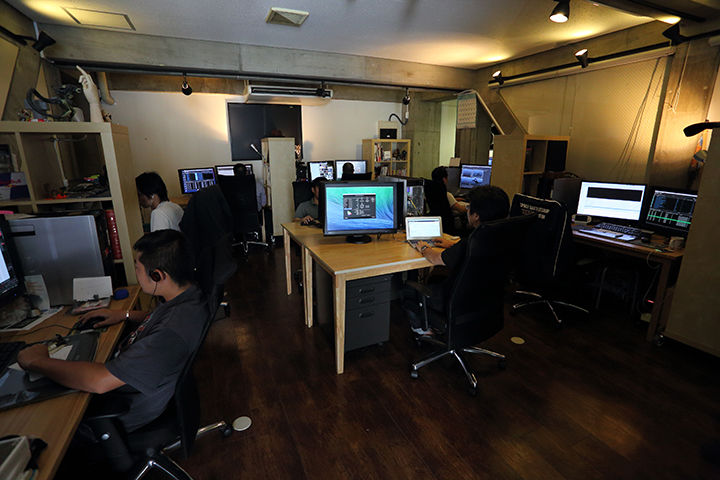
The ColorNavigator Network color-managed studio
ColorNavigator Network makes things easier not just in-house, but also for managing work with collaborating companies. Here in Japan, there are companies that don’t employ their own systems administrators, so if they can prepare even a single setup with the ColorEdge CG series, then we can handle the settings management ourselves while sharing them with our collaborators. Knowing that we can manage monitor details for our partner, from here, is a great source of relief.
For our most recent project, the film PARASYTE (released in theaters in Japan on November 29th, 2014), we shared our monitor details with our production partner company, DAG, using ColorNavigator Network as we continued through the production process. The management system allows me, the systems manager, to get a feel for every workstation at once. Then, for each studio, Mr. Hayakawa can see the details here at Chofu, and at Sangenjaya their systems department can do likewise. In the same way, the people at DAG can use ColorNavigator Network to see the details of their own managed workstations.
Could you share some details on working with DAG, using shared monitor information, on the film PARASYTE?
Suzuki: Before we even started, DAG brought a ColorEdge CG245W here and performed a calibration for us to make sure that the monitors were similar enough to each other. It was clear that they’re very attentive to monitor matters, and they were eager to set up ColorNavigator Network. Being able to do monitor management over a network made for obvious efficiency improvements. People at DAG also appreciated the fact that they were able to see monitor information like whether their calibration was successful or not at a glance, and that they can use the same project name for the settings as we are, to allow for shared use.
With this sort of mutual trust relationship, it’s best to build things gradually rather than to try to rush it all at once. I also like how you can switch between multiple settings, so I hope we can expand our activities into other fields, such as game production or things like signage, where the final target is an ordinary TV, as well as something targeting ad agencies, which handle a wide variety of images for the web, mobile applications, and TVs.For us as pros, it’s really the image that matters in the end, and so I think you have to optimize your display environment and your final quality management. You can use a master monitor to do your final check like in the past, but I really feel it’s important to make efforts to minimize any errors or discrepancies from the start of production.
Is there anything else about ColorNavigator Network that makes you glad to have it?
Suzuki: I’d like to continue using asset data that I can register with ColorNavigator Network going forward. I can register the monitor users and usage locations, so it’s easy to manage where the monitor is being used. When it comes to system administration, I also find that the ability to see the monitor firmware and the connected PCs’ OSes at a glance has proven itself more and more useful in supporting users. Of course, ColorNavigator Network also has very user-friendly color mode settings, too. I also really like that the standard color spaces preset for video production includes not just DCI-P3, but things like Rec 709, sRGB, and other standards.
Has it saved you time compared to before?
Suzuki: It has absolutely saved us lots of time. The ColorEdge CG246 and CG245W monitors allowed us to do the calibrations without needing to attach a sensor, and now (with ColorNavigator Network) we are working faster from the very beginning.
Hayakawa: I can still remember how setting up a new monitor from scratch would take a lot of time.
Suzuki: With ColorNavigator Network, I just have to load the pre-prepped settings files from the ColorNavigator NX management software, and from then on I can send settings all at once to monitors from ColorNavigator Network and start calibration, which has saved me a lot of time.
Is there anything you’d like to see in a future version of ColorNavigator Network?
Hayakawa: I’d like if the browser-based confirmation screen had a layout that would let me check with an iPad, too.
Suzuki: I’d love if there were a simpler version as an iPad app, just to let me do a daily check to make sure there haven’t been any errors or anything. Personally, I’d also like it if there were a UI that would let me see everything on a MacBook Air or Surface screen. I already have it set up to reduce the number of data columns displayed, but I’d like to see a little more work put into the UI design.
For asset management, I want to be able to use the asset management screen in ColorNavigator Network to designate a group, and then send settings to managed locations all at once. I think it would be really convenient for companies that have to manage a number of locations, and it would come in handy just for doing fine-tuning by location even just on the same floor.
Do you have any thoughts on using ColorNavigator Network in the future?
Suzuki: Well, as I was talking about earlier, the first thing that comes to mind is using it to collaborate with partner studios. For a lot of studios, just a single project would be rather small; I believe that lots of studios are working on two or three overlapping projects most of the time. I think ColorNavigator Network, which can uniformly manage multiple settings among these projects, can offer an effective solution. For us, if we add more monitors at our company that need to be managed, and if we can cut the length of time that setup and other work would take, then I think that would make for an overall reduction in wasted labor.
هاياكاوا : لسنوات عديدة، كنا نعمل باستخدام شاشات معايرة ذاتيًا. ولكن في السابق، حتى إذا أجريت تعديلات، فمع مرور الوقت، بدأت تتساءل عما إذا كانت الشاشة قد انحرفت عن الإعدادات المستهدفة، وكان من المستحيل التخلص تمامًا من هذه المخاوف. كان الموظفون يستخدمون خبرتهم للتعرف على أي اختلافات عن بيئة معاينة الشاشة، ولكن الاضطرار إلى التحقق فعليًا من الصور في غرفة الشاشة قبل إجراء التصحيحات كان مصدر إزعاج حقيقي من حيث الوقت والتكلفة.
إن وجود نظام مثل ColorEdge حيث يمكننا التأكد من إجراء المعايرة الذاتية كل أسبوع كان مصدر راحة كبير بالنسبة للموظفين، حيث كان إدراكهم أن ما يعملون عليه معاير ومطابق بشكل صحيح له فوائد نفسية أيضًا.
سوزوكي : هذا صحيح. بالنسبة لأي شخص لديه حس واضح بما يفعله، إذا بدأ بوضع ما يمكنه فعله موضع التنفيذ، شيئًا فشيئًا، فلن يكون هناك شيء لا يمكنه تحقيقه. عندما يكون لدينا عميل غير معتاد على الأمور المتعلقة بالألوان، يتعين علينا إيجاد طرق أبسط لشرح أنفسنا؛ ColorEdge مفيد ليس فقط لاستخدامه، ولكن لمساعدتنا في القيام بالمهمة المهمة المتمثلة في نشر المعرفة والوعي بالأمور المتعلقة بالألوان.
هاياكاوا : مع اقتراب شاشات المراقبة الرئيسية الموثوقة لدينا من نهاية عمرها الافتراضي، أعتقد أن الكثير من الناس كانوا قلقين بشأن المكان الذي يجب أن يضعوا فيه أهدافهم. من المهم أن يكون لديك بيئة رئيسية يمكنك تعيينها كهدف، ولكن من المهم أيضًا إدارة الجودة أثناء عملية الإنتاج باستخدام شاشات مراقبة ColorEdge، والعمل في بيئة أقرب ما يمكن إلى بيئتك الرئيسية. إن وجود أداة إدارة مثل ColorNavigator Network لدعم هذه البيئة قد قلل حقًا من العبء على موظفينا.

|
شكرنا لـ: شركة شيروجومي |
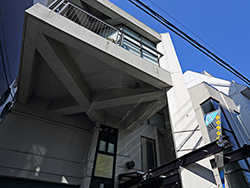 ستوديو تشوفو |