
دراسات الحالة
كوكب مارزا للرسوم المتحركة
|
نجحت شركة مارزا في تقليص إدارة المراقبة بنسبة 90% بعد التنفيذ أثناء الإشراف على العمليات في العديد من المواقع المحلية والخارجية. مقابلة مع ناويا سوغيتا ، إدارة الأنظمة |
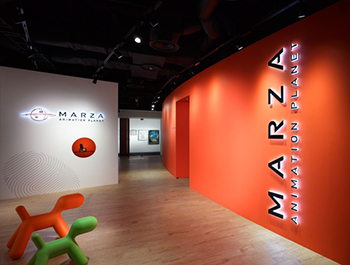 |

هل يمكنك أن تخبرنا عن تنظيم فريق مارزا أنيميشن بلانيت وبيئة الإنتاج؟
 منذ تركيب إجمالي 55 شاشة CG275W في عام 2011، حصلنا على شاشات يمكنها معايرة الأجهزة للفرق التي تحتاج إلى ألوان دقيقة. هذه الشاشات من إنتاج EIZO بشكل أساسي، مع بعض شاشات Dell وWacom (أجهزة لوحية LCD) أيضًا. تعمل شركتنا بشكل أساسي في مجال الأفلام، لكن عملنا يشمل مجموعة واسعة من المجالات، بما في ذلك الألعاب أو الأحداث أو ألعاب الملاهي.
إن معداتنا الداخلية موجهة في الغالب نحو إنتاج الأفلام، لذا نستخدم نفس نوع جهاز العرض المستخدم في مرحلة ما بعد الإنتاج، وقد قمنا بتهيئة بيئة هنا تسمح لنا بفحص عملنا بنفس الطريقة التي يتم بها تنفيذ عملية ما بعد الإنتاج، والتي تأتي بعد ما نقوم به. غالبًا ما نعمل على مشاريع متعددة ومتنوعة في وقت واحد، ونستخدم نفس المعدات لفحص أشياء أخرى غير الأفلام، مثل الرسوم المتحركة للأحداث أو أفلام ركوب الملاهي. أما بالنسبة لجهاز العرض الخاص بنا، نظرًا لعدم اتساق السطوع، فإننا نقوم بالمعايرة مرة كل ثلاثة أشهر. لمراقبة تغيرات سطوع جهاز العرض، لدينا شاشة ColorEdge خلفه، والشاشة مهيأة لعرض نفس الشيء الموجود على شاشة جهاز العرض للمقارنة ومعرفة ما إذا بدأنا في الحصول على أي تناقضات، وعندما تبدأ في الحدوث، نقوم بضبط سطوع جهاز العرض.
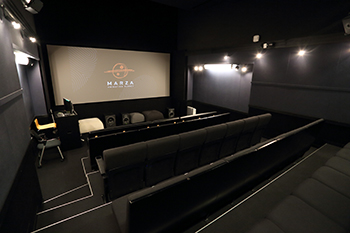 غرفة العرض غرفة العرض |
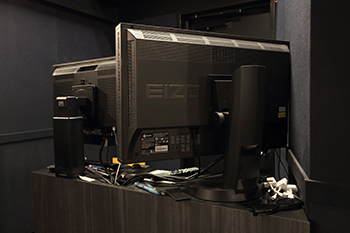 شاشة ColorEdge في غرفة الفحص شاشة ColorEdge في غرفة الفحص |
ما الذي جعلك تقرر تثبيت شاشات ColorEdge؟
كان معيار اختيارنا للشاشات هو أنها تتميز بمعايرة الأجهزة. وكانت قدرة ColorEdge على إجراء معايرة تلقائية دورية هي ما منحها الأفضلية في النهاية.
علاوة على ذلك، فإن دعم الإدخال 10 بت، بالإضافة إلى الدعم لأنظمة Windows وMac OS X وحتى Linux، هو ما حسم قرارنا بالحصول عليها.
قبل أن نحصل عليها، كنت أعتقد أنه سيكون من الرائع والسهل حقًا أن يكون لدينا شاشة يمكنها إجراء تعديلات دورية تلقائيًا، ولكن عندما بدأنا في استخدامها بالفعل، واجهنا مشاكل مع الشاشات التي لا يمكنها إجراء التعديلات. وعندما حاولنا تعقب السبب، اتضح أننا لم نسمع أنهم غيروا أجهزة الكمبيوتر. أخبرنا موظفينا عندما حصلنا على الشاشة أنه إذا قمت بتغيير الكمبيوتر، فلن تتمكن الشاشة من إجراء معايرتها، ولكن بالطبع نسينا ذلك بحلول ذلك الوقت. لقد تحولنا إلى ColorEdge دفعة واحدة لجميع أعضاء فريق العمل لدينا، لذلك كان هناك بعض الفوضى عندما كنا في الواقع ننتقل في البداية.
ما هي المعايير التي تستخدمها لأهداف المعايرة الخاصة بك؟
|
We calibrate to DCI P3, sRGB, and REC.709 standards, depending on the job. Right now, we’re working on an original movie called Robodog, and we’re using DCI as our standard for that. However, the DCI coverage is different from a projector, so it’s impossible to get absolutely identical colors, though it’s still a challenge to really understand that. It’s important that we be able to see things with the same standard during production, and I think that doing final adjustments in the DI process is the proper flow. |
 |
| |
The film Robodog (original title) currently in production |
Could you tell us about why you chose to try ColorNavigator Network from the start, as well as your feelings on using it?
For a while, I’d wanted an environment where I could check all of our monitors’ states and adjust settings at the same time.
We tried it out on three computers: one running Windows, one running Linux, and one Mac. The first thing I noticed was that the initial setup was much faster than anything I’d ever used before. We had three custom calibration target settings, and in ColorNavigator 6, which we’d been using up to that point, the initial setup and calibration for each of these three targets would take 30 minutes, and even if we did the setup simultaneously, we still had to go through this process for 55 monitors.
Also, when we would start a new project, we would have to change the calibration settings on each of our production monitors, and even with the built-in calibration sensor on the ColorEdge, it would still take 30 minutes to do five of them. (And before even that, back when we had to do software calibration, it would take a whole hour for each monitor…)
Being able to take care of target calibration in a single go with ColorNavigator NX has been great. When we then installed ColorNavigator Network, sending all of the settings out at once felt especially convenient. The initial setup with ColorNavigator NX takes maybe three minutes for five machines; we can set up all of the monitors we have here in around half an hour. We can go and set them all to do initial settings, and then after they’re done we can send instructions over the network. Then, if you see that you aren’t getting results back from some of them, you just have to check whichever ones had issues. You don’t have to calibrate each monitor one by one and wait until it’s finished. Even if we add more in the future and bring the total number up to 100 monitors, once the initial settings are done, it’s possible to do the calibrations all at the same time, and that’s really appealing.
Even if you consider the time and effort needed to change over from our current ColorNavigator 6 to ColorNavigator NX, I feel it’s a necessary solution for working on multiple projects at the same time.
When working concurrently, you need to be able to do multiple color management tasks. Even within the same team, there are times when they need to use different color settings for their work environments depending on the day, and so I think that being able to quickly change color settings is vital. Being able to switch color modes at the press of a button with ColorNavigator NX has been incredibly convenient. In ColorNavigator NX, the calibration settings are linked with the color mode selected on the monitor, and I can change the name to match the project, which has made things easier to understand than in ColorNavigator 6. Also, the CG275W monitor that we already have has a hardware limit of three calibration targets for color mode settings, so it might make things kind of tough if we don’t switch to the new CG277or CG247. Being able to have 10 different settings on the CG277 would be really convenient.
In ColorNavigator 6, even if you do the periodic automatic calibration with the internal sensors, various factors like the PC changes that I mentioned earlier can cause some monitors to wind up not being adjusted. I would say that being able to see at a glance whether calibration was successful or not has been a major benefit of installing ColorNavigator Network.
In ColorNavigator Network, do you lock the control buttons on the production monitors?
When you’re doing multiple jobs, I think it’s important to be able to switch settings on your own, so we don’t lock them. I think making all of the settings available, so everyone can carefully manage their own settings to suit each project, is a better style overall.
What do you think of the administrative privileges for ColorNavigator Network?
I handle the settings. However, for the adjustment result checks, I’m thinking of handing over the authority to the team leaders on a group level. It’s each designer’s job to take responsibility for the product they’re working on, so I think it’s best that the team leaders check that there aren’t any problems with what they’re using the monitors for. At the moment, I take care of calibration work, but I’d like to be able to leave that to the teams in the future.
Is there anything you’d like to see in ColorNavigator Network?
It would be nice to have a smartphone app that could do status checks. If I head out with an iPad instead of a computer, it would be convenient to be able to check which monitors had unsuccessful adjustments. If I handed over the permissions to check the results to the users, like I mentioned, we would need something that would allow us to simply and easily check them.
It would also be nice to have a way to get an alert if a monitor’s settings had strayed from the target, or if the colors drifted away from the standard.
Do you have any thoughts on using ColorNavigator Network in the future?
بعد إنشاء بيئة الشبكة الخاصة بنا، أود أن أجعل إعداداتنا عامة. سيكون من المفيد للجميع أن يتمكنوا من القول، "بالنسبة لعملنا، نستخدم ColorEdge مع هذه الإعدادات لبيئة الإنتاج، ويمكنك التحقق من عملنا من بعيد ومعرفة أنك ترى نفس الشيء الذي نراه بالضبط". سيكون التواصل بين المكاتب الفرعية أو بين الشركات أسهل بكثير. من المرجح أن تكون قيمة المسافة أكبر كلما زادت المسافة.
الآن، من المؤكد أنك ستواجه أسئلة مثل ما إذا كان يجب إظهار اسم المشروع أم لا، أو ما إذا كان يجب جعل أسماء المعدات عامة أم لا، ولكن يمكنك، على سبيل المثال، الحصول على إعدادات لاستخدامها كمعيار، وربما تكون قادرًا على تقديم تعليمات لاستيراد هذه الإعدادات، أو شيء من هذا القبيل. في صناعة الرسوم المتحركة بالكمبيوتر، لا تعمل فقط داخل شركتك الخاصة، أو حتى محليًا: فنحن نرى بشكل متزايد وظائف تنطوي على تعاون دولي، لذا إذا كان بإمكانك عرض الأشياء بنفس إعدادات الألوان المُدارة مثل زملائك في العمل، فسيكون ذلك بمثابة راحة كبيرة.
عند التفكير في التواصل والتعاون بين الشركات المختلفة، حتى لو لم يكن لدينا شاشات ColorEdge متعددة، أعتقد أن هناك فوائد كبيرة لتطبيق ColorNavigator Network. لدينا فرع في أمريكا، ولديهم شاشة CG246 هناك. أجد نفسي أتساءل عما إذا كنت سأتمكن من إجراء إعدادات المعايرة دون السفر إلى أمريكا [يضحك]، لذلك في المستقبل أود أن أدرج مواقع في الخارج بين المواقع المتعددة التي يمكنني الإشراف على عملياتها.
شكرنا لـ:
مارزا أنيميشن بلانيت، المحدودة
www.marza.com/